
A moneylender's dated off-the-shelf system could not be changed. So statutory reports were built by hand in Excel, and each one took about a week. The process around the software had stopped fitting the business, and staff filled the gap by hand.
This guide explains business process optimisation in plain words. You will learn what it means, why it matters, and a five-step way to do it. You will also get a rule for which process to fix first. And you will get a test for when you need new software.
Key takeaways
- Business process optimisation means changing how work flows, so it takes fewer steps, less time and fewer errors.
- Fix the process before you automate it. Automating a messy process makes the mess run faster.
- In a 2017 Smartsheet survey, 42% of workers spent more than 10 hours a week on repetitive, manual tasks.
- MuleSoft's 2025 benchmark found the average enterprise manages 897 applications, and only 29% are integrated.
- Start with processes that run daily and hurt the most. Leave rare, low-pain ones for later.
What is business process optimisation?

Business process optimisation means changing how a task flows through your business. The goal is fewer steps, less time and fewer errors. A process is any repeated piece of work, such as approving an order or sending an invoice. Optimising it means removing waste first, then using software where it helps.
You will also see it written as business process optimization, the US spelling. Either way, the idea is the same.
Picture a simple example. A form gets added, then an approval email, then a spreadsheet to track the approvals. Each step made sense when it was added. Together they slow everyone down. Optimisation asks whether each step should exist at all. Automation, by contrast, makes a computer do a step, whether or not the step is useful.
Why does process optimisation matter for your business?

Process optimisation matters because slow, manual steps cost staff time every day, and the cost grows as you grow. Each extra branch, product or customer adds more copying, checking and chasing. The same handoffs and approvals happen many more times a day. Fixing the process gives time back and cuts errors together.
The time lost is large. In a 2017 Smartsheet survey, 42% of workers spent more than 10 hours a week on repetitive, manual tasks. That is more than a quarter of their working week. Smartsheet's report found email, data collection and data entry took the most time.
Disconnected systems make it worse. The 2025 MuleSoft Connectivity Benchmark drew on more than 1,050 IT leaders. It found the average enterprise manages 897 applications, yet only 29% are integrated. When systems do not talk, people carry data between them by hand. That is the "type it in twice" tax.
How do you optimise a business process?
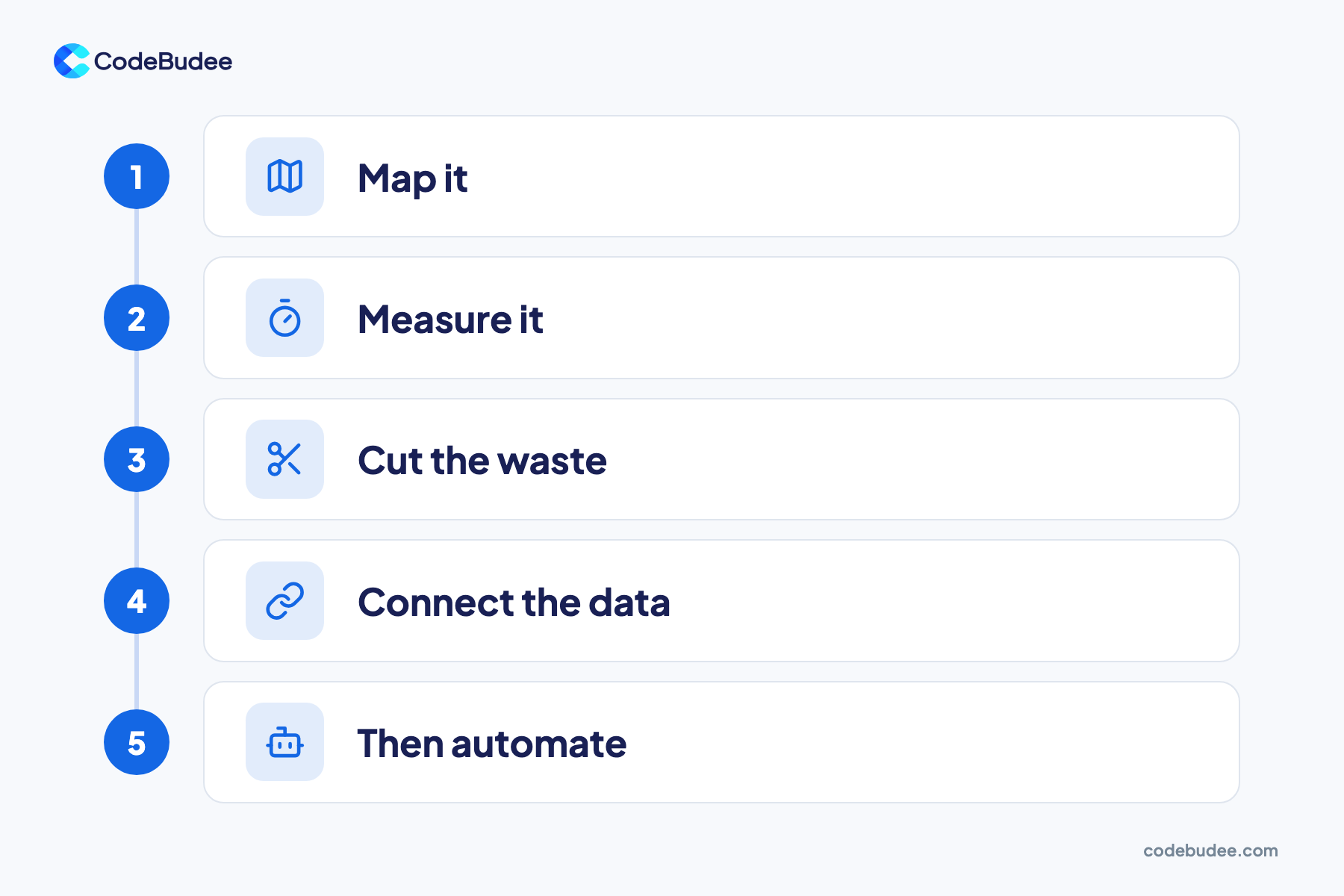
You optimise a business process in five steps. Map it, measure it, cut the waste, connect the data, then automate. The order matters, because each step depends on the one before. Skip straight to automation and you lock in the old waste. It then runs faster and becomes harder to change.
- Map it: write down every step, who does it and what they need to start. Walk through a real case, not the ideal one.
- Measure it: time each step, and count the errors and handoffs. Note where work sits waiting.
- Cut the waste: remove steps that add nothing, such as approvals nobody reads or copies nobody uses.
- Connect the data: keep each piece of information in one place, so nobody types it twice.
- Then automate: let software handle the steps that are left and repeat often.
After a few weeks, measure again. Compare the new times and error counts with your first map. Keep what worked, and repeat the loop on the next process.
Which processes should you fix first?
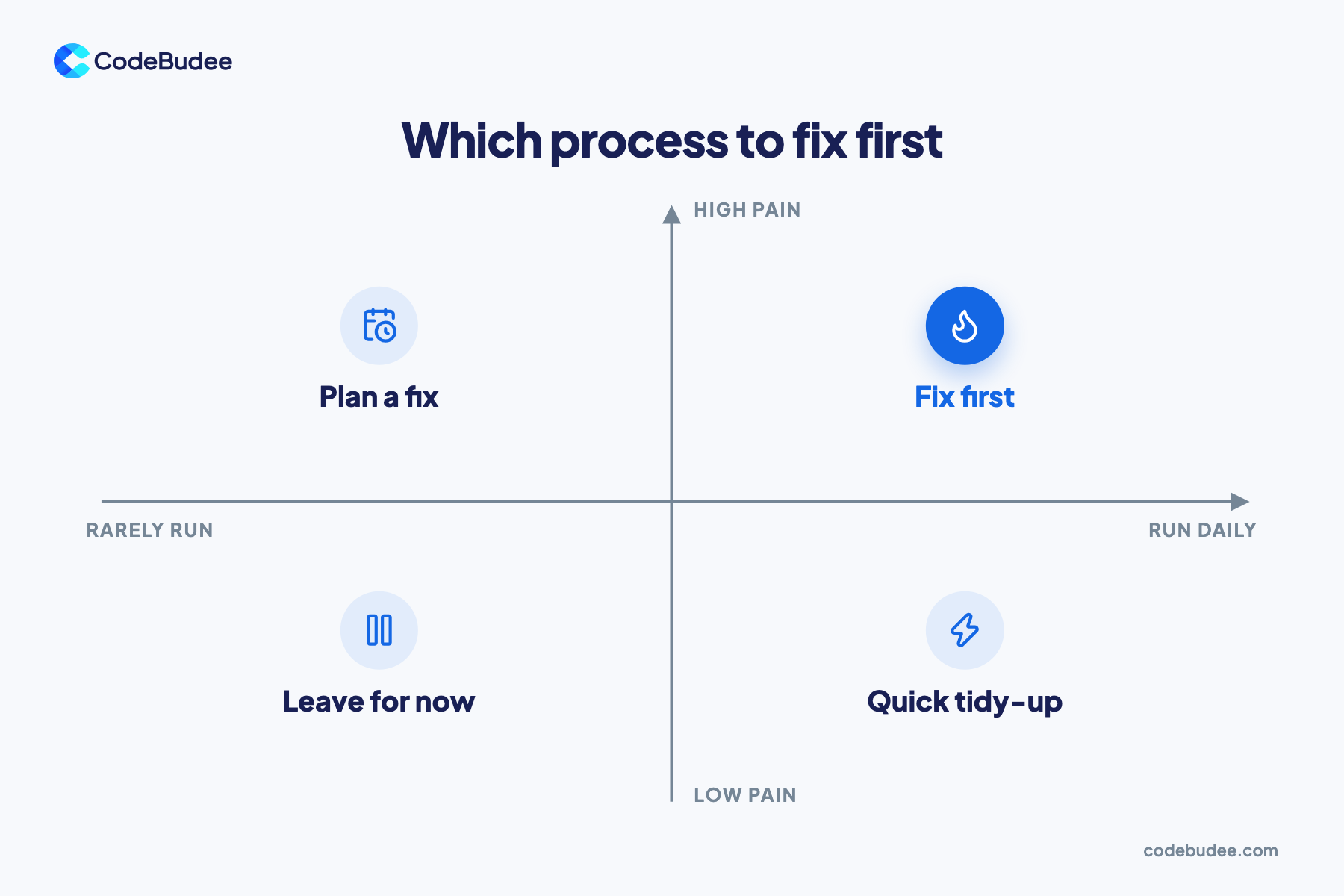
Fix the processes that run often and cause the most pain first. A daily task that wastes ten minutes costs more time than a yearly task that wastes a day. Score each process on two things: how often it runs and how much it hurts. Then start where both scores are high.
- Run daily, high pain: fix these first. Daily tasks such as order entry, invoicing and stock updates may sit here.
- Run rarely, high pain: plan a fix, such as for a monthly statutory report.
- Run daily, low pain: a quick tidy-up is often enough.
- Run rarely, low pain: leave these for now.
Pain can mean time, errors, customer complaints or risk. A monthly report that takes a week by hand is high pain, even though it runs rarely. Write your scores down, so the whole team agrees on the order.
When does process optimisation need new software?
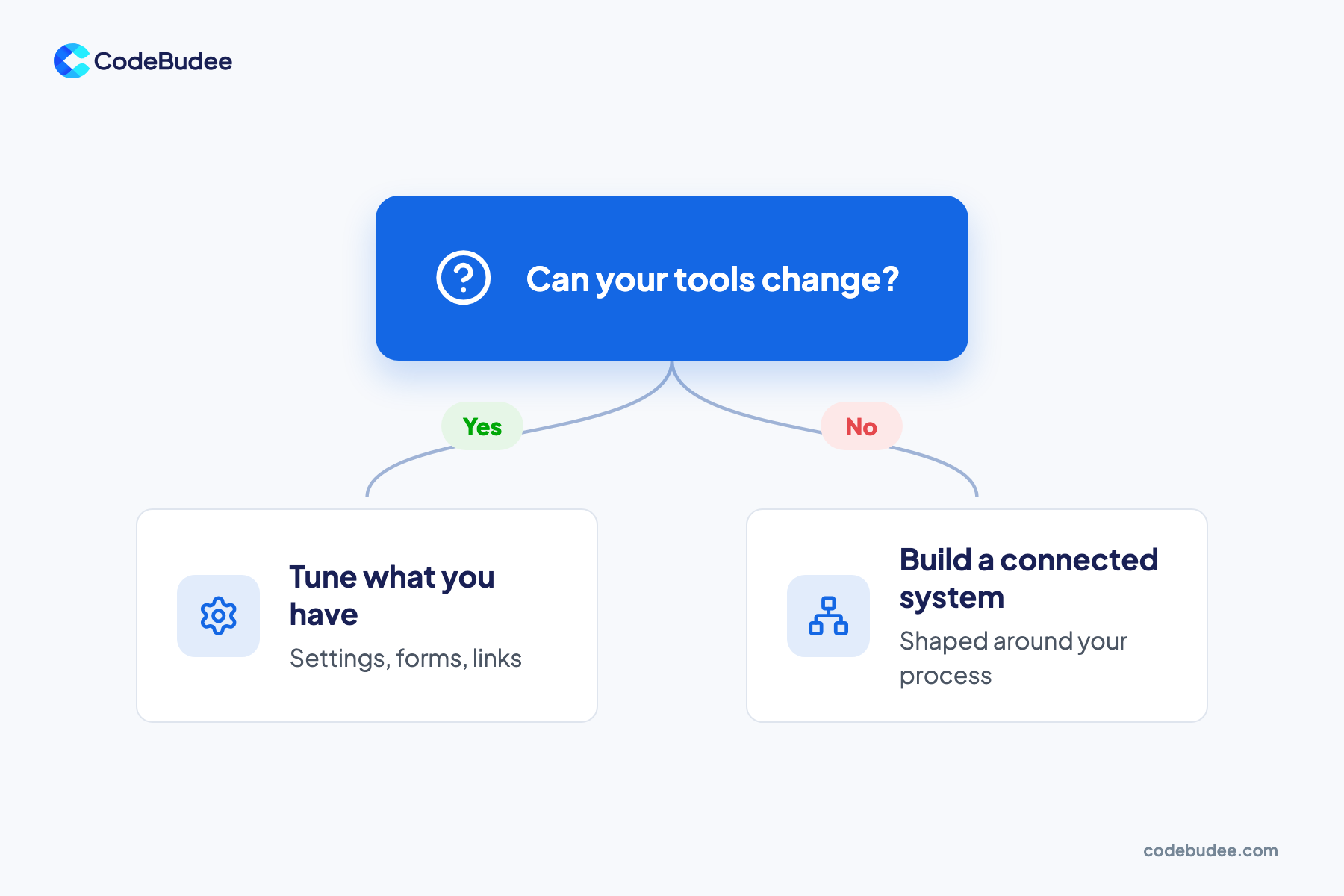
Process optimisation needs new software when your current tools cannot change to fit the better process. If settings, forms or simple links between tools close the gap, start there. Your system may block the change, or your data may sit in tools that cannot connect. Then a connected system built around the process is the fix.
Signs you have hit that limit:
- Your vendor says the feature you need cannot be built.
- Staff keep spreadsheets beside the system to finish their work.
- The same data lives in two or more tools that do not sync.
- Reports take days, because someone must pull data together by hand.
Ready-made tools still fit many businesses. Compare the options in low-code, no-code or custom code. If spreadsheets carry the load today, read why it pays to replace Excel with a web app.
How CodeBudee approaches this
We shape the software around how your business works. For a Malaysian moneylender, we built a custom loan management platform with LHDN MyInvois e-invoicing. Statutory reporting went from about a week to instant. About 10 hours a week of manual re-entry was removed. You can see it in our work.
If your tools no longer fit how you work, custom web app development can close the gap.
Frequently asked questions
What is the difference between process optimisation and automation?
Optimisation changes the process itself: which steps exist, who does them and where the data lives. Automation hands a step to software, so nobody does it by hand. Both help, but the order matters. Optimise first, so you automate only the steps worth keeping. Automating first can lock a slow process into code.
How long does business process optimisation take?
It depends on the size of the process. Start small: map one process, time it for a week and remove the easiest waste first. Some fixes, such as dropping an extra approval, can start straight away. A new connected system takes longer. For us, a web system usually takes about three to six months to build.
Do small businesses need process optimisation?
Yes, and it is often easier for them. Fewer people means fewer handoffs to map and fewer habits to change. Fixing a process early also stops workarounds from spreading as the business grows. A small team that maps its order or booking flow now avoids rebuilding it under pressure later.
Can AI optimise our processes for us?
AI can help with parts of a process, such as reading documents or sorting requests. It works best on a process that is already clear, with clean, connected data. In the 2025 MuleSoft report, 95% of organisations faced challenges integrating AI into existing processes. Fix and connect the process first. See signs your data is not ready for AI.
Your next step
Business process optimisation starts with a map of how work flows today. Pick one process that runs daily and hurts, then map it, time it and cut the waste. Connect the data, then automate what is left. If your current tools block the fix, that is the point to look at a connected system.
If your team still re-keys data between systems, book a free consultation. We can talk through which process to fix first.
