
Many businesses move their systems to the cloud and assume the provider now protects their data. The big providers say otherwise. Microsoft's guide says: "For all cloud deployment types, you own your data and identities". The provider looks after the building and machines. What happens to your data is still your job.
This guide explains cloud data protection in plain words. You will see who does which job and where the real risks are. You will also see Malaysia's rules on storing data abroad. It ends with six jobs your provider leaves to you.
Key takeaways
- Protecting cloud data means keeping the business data you store in cloud services safe from loss, theft and misuse.
- Providers protect their data centres and hardware. Your data, user accounts, access rules and settings stay your responsibility.
- Wrong settings and weak logins are top cloud risks. Only 66% of firms in a 2025 study had set up MFA.
- Personal data can leave Malaysia only under set conditions, such as the other country having similar data protection law.
What is cloud data protection?
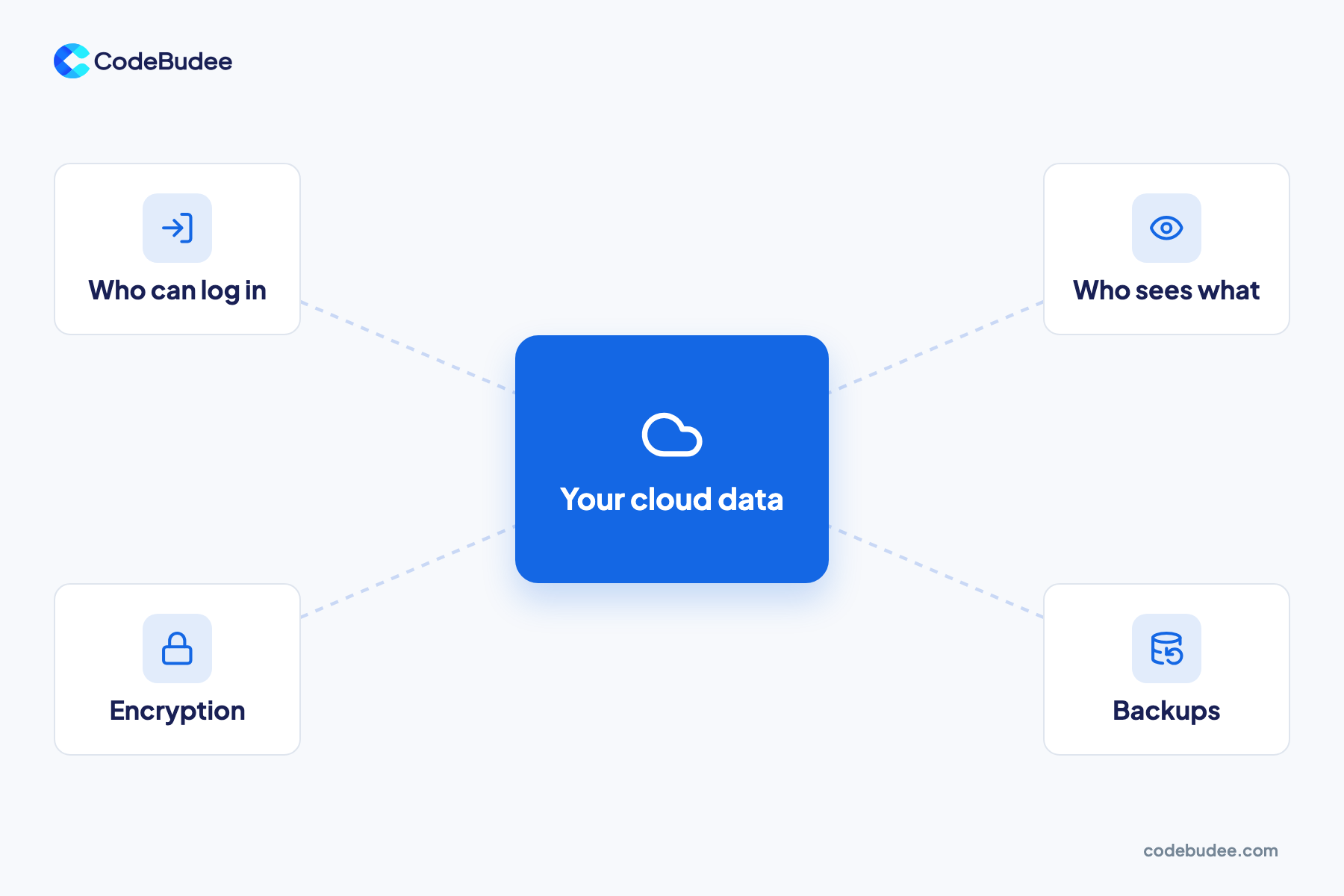
Cloud data protection is the set of jobs that keep business data safe once it lives in cloud services. It covers who can log in and what each person can see. It also covers encryption, where data is stored and how you recover it. Some jobs belong to the provider. Most data jobs belong to you.
Encryption means scrambling data so only someone with the right key can read it. Backups are copies you can restore if data is deleted or locked by an attacker.
These services come in different forms. You might rent servers, use a hosted database, or log in to ready-made software. In every form, the data inside is yours to protect.
Who is responsible for your data in the cloud?
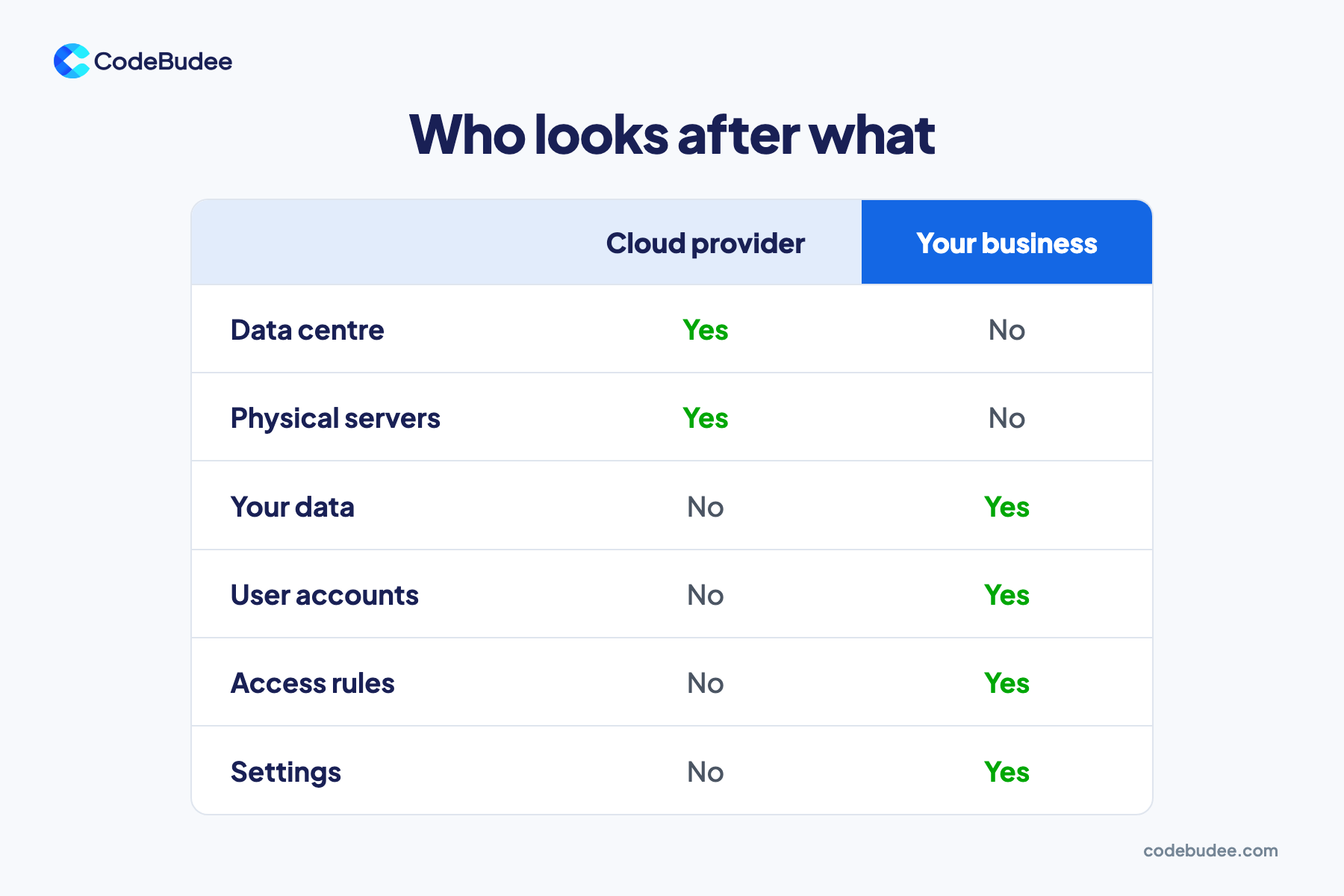
Responsibility is shared. The provider protects the physical data centre, servers and network. You protect your data, your user accounts, who has access and how your services are set up. This split is called the shared responsibility model. AWS and Microsoft both publish one.
AWS says it protects "the infrastructure that runs all of the services." Customers manage their own data and encryption. They also set user permissions.
Microsoft's shared responsibility guide lists four jobs you always keep, whatever service you use:
- Data: sorting it, protecting it and deciding what to encrypt.
- Devices: the laptops and phones your staff use to log in.
- Accounts: creating user accounts and removing them when people leave.
- Access management: deciding who can reach what, including MFA.
Bottom line: moving to the cloud hands over the hardware, not the duty of care for your data.
What are the biggest risks to business data in the cloud?
The top-ranked cloud risks come from how services are set up and who can log in. Think of a setting left open by mistake, a stolen password or a supplier with too much access. All of these are jobs the customer owns.
Three sources point the same way:
- Wrong settings: the Cloud Security Alliance's 2024 Top Threats report put wrong settings and poor change control first. That ranking came from a poll of more than 500 industry experts.
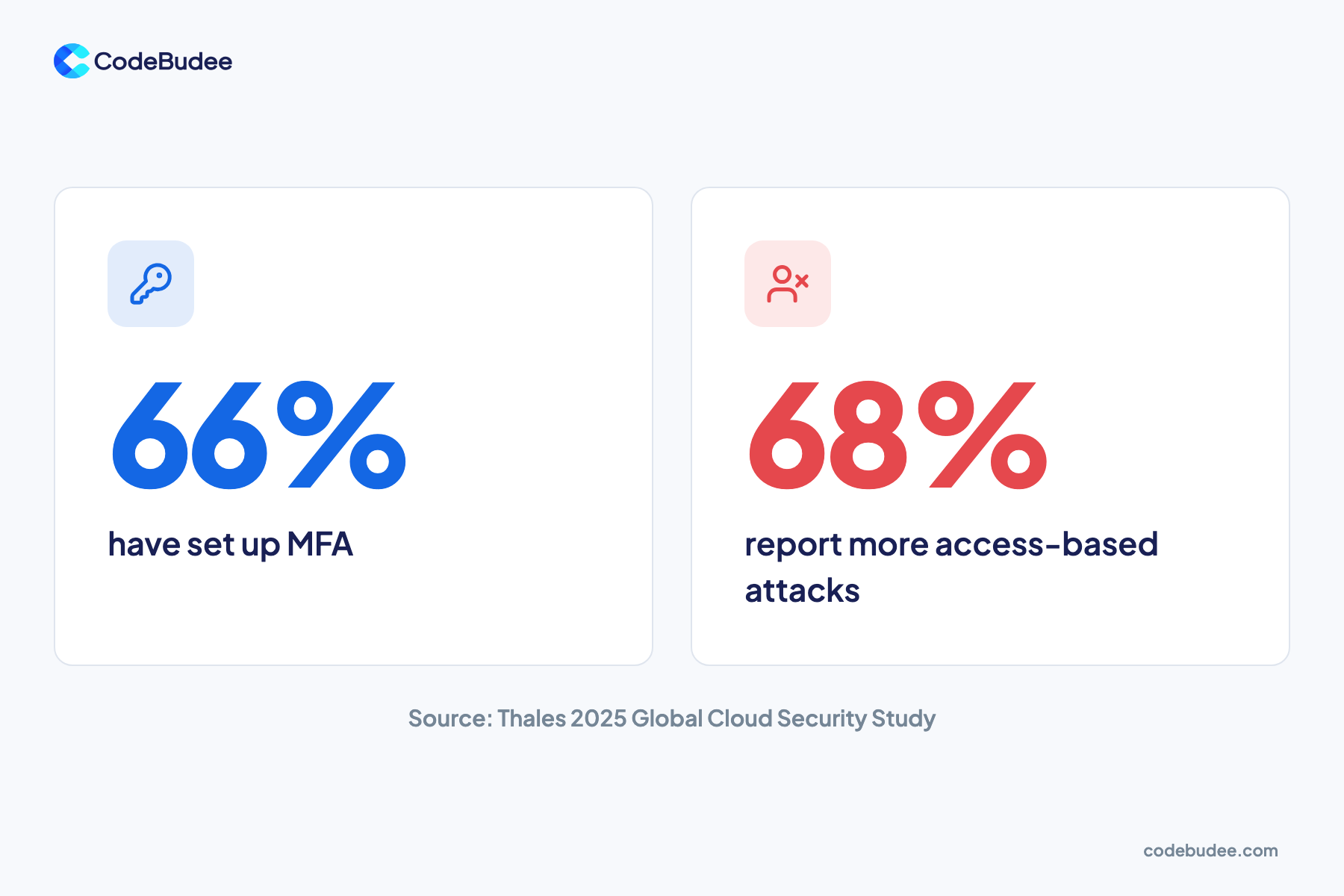
- Weak logins: only 66% of firms used MFA (a second login check), per the Thales 2025 cloud study. Also, 68% of respondents reported a rise in access-based attacks.
- Suppliers: Verizon's 2026 Data Breach Investigations Report found that 48% of breaches involved a third party.
Much of this data is sensitive. In the same Thales study, 85% of organisations said at least 40% of their cloud data is sensitive. If that data gets out, see our guide on what a data breach is and the 72-hour rule.
Can you store customer data in a cloud outside Malaysia?
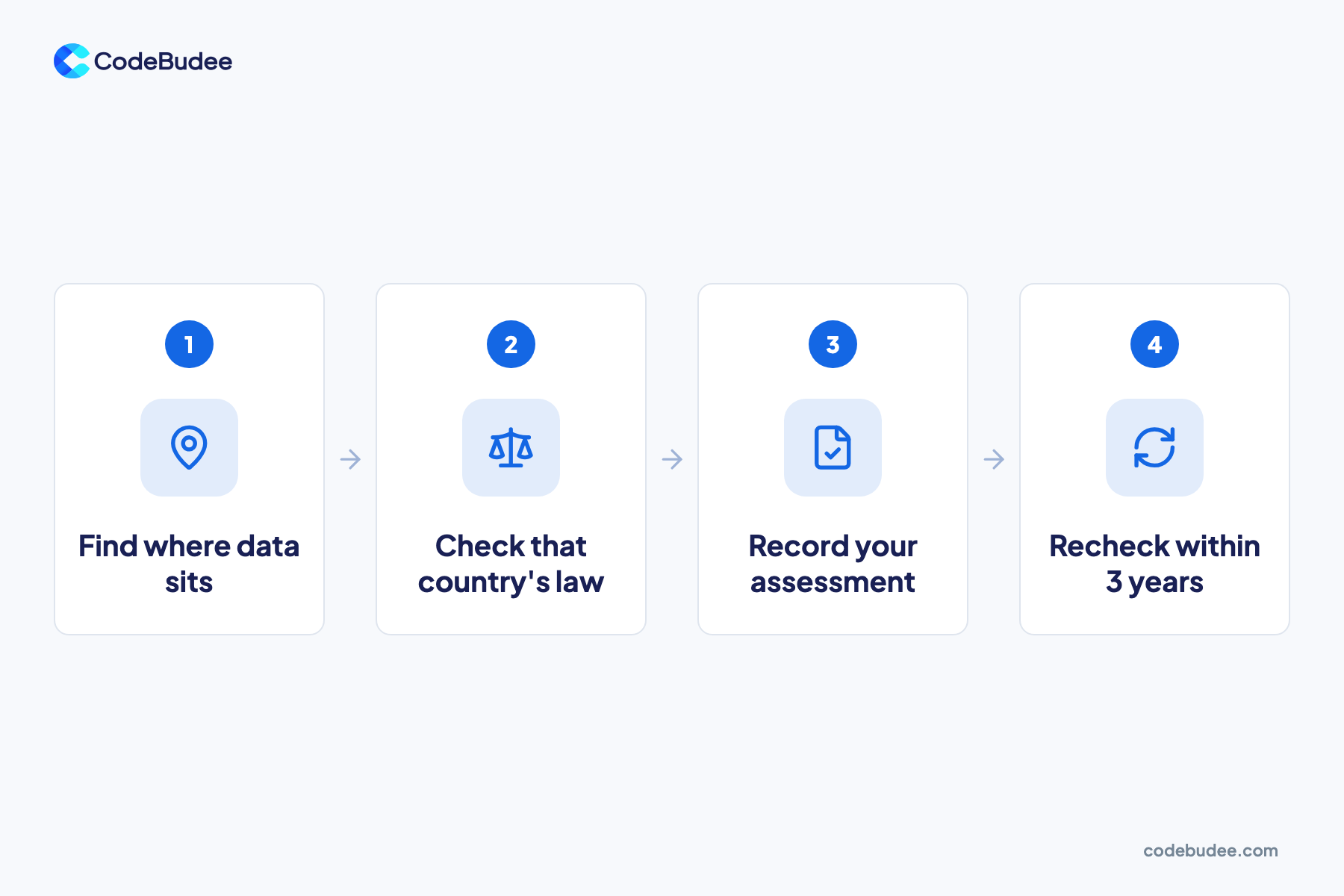
Yes, under set conditions. Malaysia's law lets personal data go abroad if the other country has a substantially similar law. It also allows it where that country gives an adequate level of protection. Other routes exist, such as the customer's consent. Your cloud service may store data overseas, so check where yours sits.
The Personal Data Protection Commissioner's cross-border transfer guideline sets out the routes:
- Similar law: the receiving country has a law substantially similar to Malaysia's Act 709.
- Adequate protection: the receiving country protects personal data at least as well as Act 709.
- Consent: the customer has agreed to the transfer.
- Contract: the transfer is needed to carry out a contract with the customer.
For the first two routes, the guideline describes a Transfer Impact Assessment. That is a written check of the other country's data protection law. Its findings are valid for no longer than three years. After that, you check again.
In practice, this means you need to know which country each cloud service stores your data in. A simple list of your services and their storage regions is a good start.
What 6 jobs does your cloud provider leave to you?

Six jobs stay with you in every cloud service. Know where your data lives, turn on MFA and limit access by role. Then control settings changes, encrypt sensitive data and test your backups. No provider can do these fully for you.
- Know where your data lives. List each cloud service, what data it holds and which country stores it.
- Turn on MFA for every account. A stolen password alone should not be enough to log in.
- Give access by role. Staff and suppliers see only what their job needs. Remove access the day someone leaves.
- Control settings changes. One named person approves changes to storage and sharing settings, and you keep a record of each change.
- Encrypt sensitive data. Use the encryption options your services offer, and decide who holds the keys.
- Test your backups. Keep copies apart from the main system and try a full restore before you need it.
Some off-the-shelf tools decide some of these for you. You may not control roles, logs or where data sits. If your business runs on its own system, you can design these jobs in. A custom web app development project can build roles, access logs and encryption into the system from the start. For the wider case for the cloud, see how cloud-based systems protect your business.
Frequently asked questions
Is cloud storage safer than keeping data on our own server?
It can be, if you do your share. Microsoft lists common gaps in on-premises setups, such as delayed patching, weak physical security and untested backups. In the cloud, the provider takes over the hardware and data centre work. But your data, accounts and settings stay with you. A cloud service with weak logins and open settings is not safer.
Can we store Malaysian customer data in a Singapore cloud region?
You can, if the transfer meets one of the conditions in Malaysia's law. The main routes are a similar law abroad, adequate protection, the customer's consent, or a contract need. For the first two, the Commissioner's guideline describes a Transfer Impact Assessment, valid for up to three years. Check the guideline or get legal advice for your case.
If our cloud provider has a breach, who is responsible?
In Malaysia, the duty to report a personal data breach sits with you as the data controller. The controller is the business that decides how the data is used. The Commissioner's breach notification guideline says your contracts must oblige processors to tell you promptly. So check what your cloud contract says about breach notice.
What is MFA, and why does it matter for cloud data?
MFA, or multifactor authentication, asks for a second proof when someone logs in. That might be a code from a phone app. With MFA on, a stolen password alone does not open the account. Anyone can reach a cloud login page over the internet. Without MFA, a password is the only lock.
Your next step
Protecting cloud data is a shared job. The provider runs the buildings and machines. Your data, accounts, access and settings stay with you, and that is where the top-ranked risks sit. Malaysia's rules also expect you to know where personal data is stored.
If you are not sure who does each of the six jobs today, that is the place to start. Book a free consultation to talk through how your systems handle access, settings and backups.
