
Your first version works. A few customers use it, the demo went well, and now more people want in. Then small cracks show. A fix in one place breaks another, and the app slows down at busy times. Only one developer knows how it all fits together.
This is the moment an MVP meets real growth. An MVP (minimum viable product) is the first basic version, built to test an idea. This guide explains what changes on the way from MVP to production. You will see the signs your system will not cope. You will also learn how to choose between a rebuild and a fix.
Key takeaways
- An MVP proves people want the product. A production system must also stay up, keep data safe and change without breaking.
- Warning signs include fixes that break other features, slowdowns at busy times and code only one person understands.
- Before you scale, add four basics: security, tested backups, automated tests and monitoring.
- An AI-built prototype is not a production system your business can depend on. Its code needs a careful review first.
- Harden the MVP when its core is sound. Rebuild when every change fights the original design.
What is the difference between an MVP and a production system?
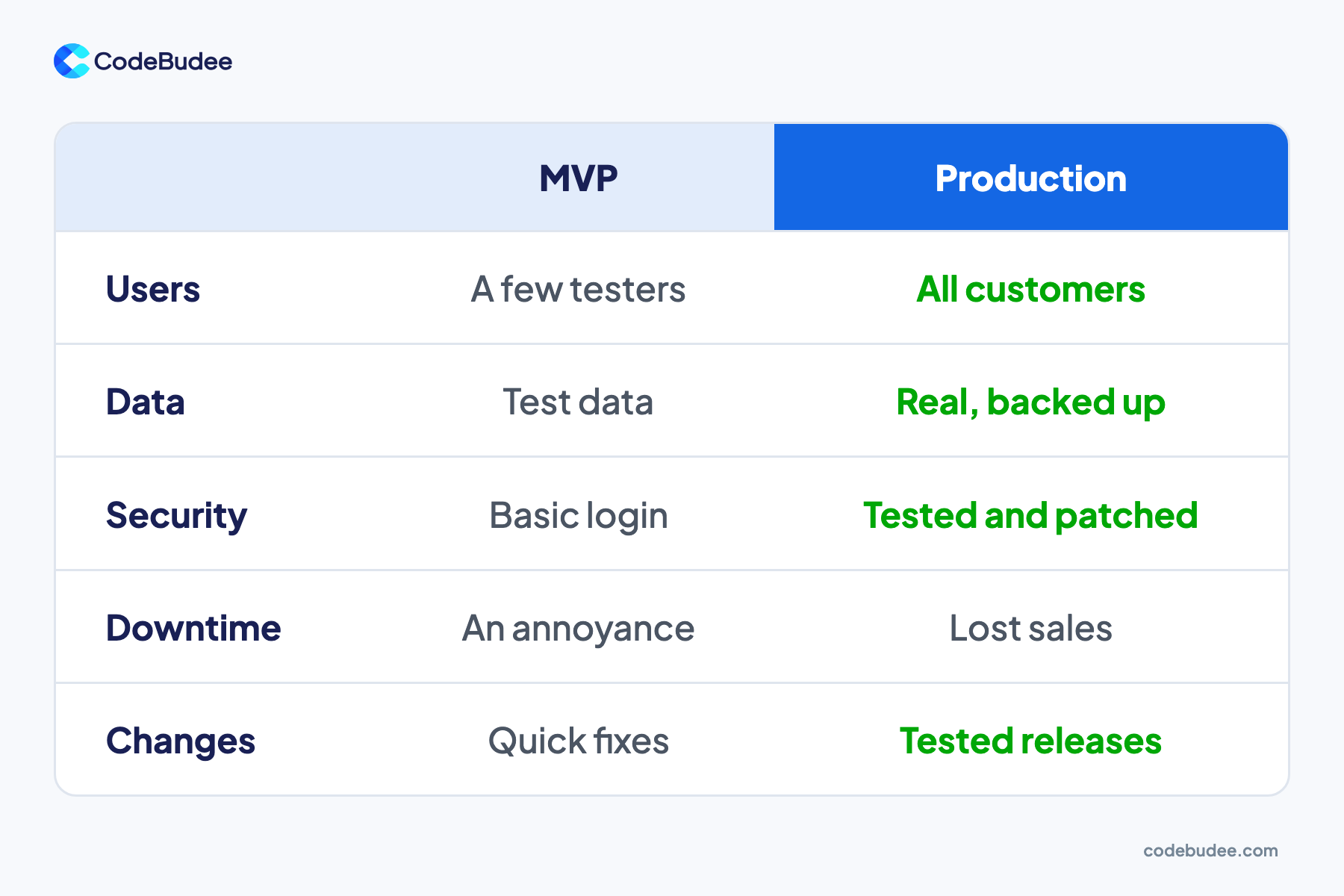
An MVP is the first basic version of a product, built to test whether people want it. A production system is software your customers and staff depend on every day. It must stay up, protect real data and accept changes without breaking. The MVP asks "will they use it?" Production asks "can we depend on it?"
Speed is the right goal for an MVP. You skip features, use simple set-ups and accept some rough edges. That trade-off is fine while only testers use it. It stops being fine once paying customers and real data arrive.
A production system adds the work nobody sees in a demo:
- Real data, protected: customer records are backed up, and only the right people can see them.
- Tested changes: each update is checked before it reaches customers.
- Someone watching: errors and slowdowns raise an alert before customers complain.
- Room to grow: the system handles more users without a rewrite.
How do you know your MVP will not cope with growth?
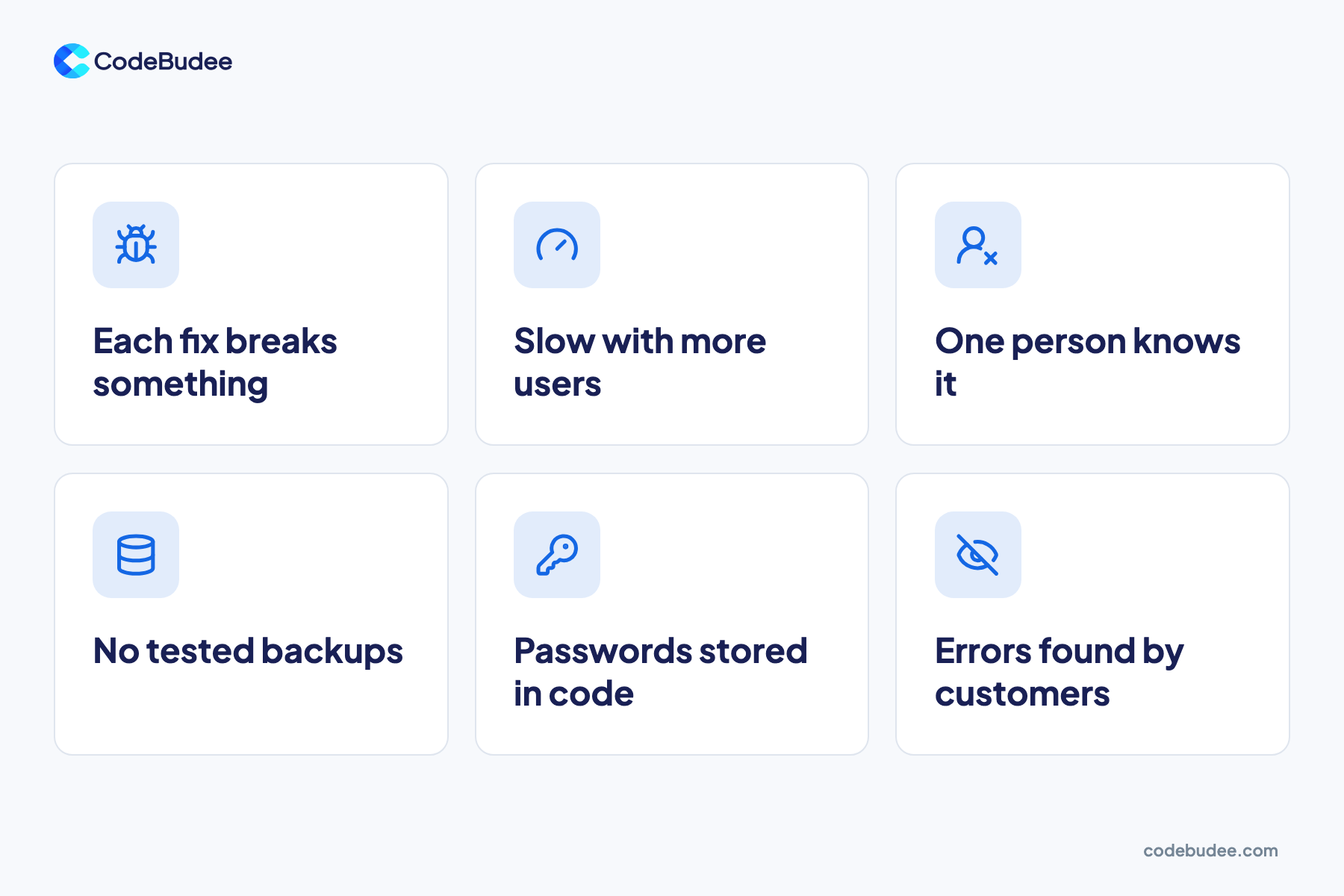
Your MVP will struggle with growth when small changes become risky and slow. Watch for fixes that break other features and pages that slow down at busy times. So is code that only one person understands. Missing backups and passwords kept in the code are warning signs too. Two or more of these mean it is time to act.
- Each fix breaks something else: parts of the code depend on each other in hidden ways. A small change has side effects nobody expected.
- It slows down with more users: pages that load fast for a few users get slow as traffic grows.
- One person knows how it works: if that developer leaves, nobody can safely change the system. Read the signs your developer is holding you back.
- No tested backups: a backup you have never restored is only a hope.
- Passwords stored in the code: secret keys sit in the code, not in a secure store. Anyone who sees the code can use them.
- Customers find the errors: you learn about bugs from complaints, not from your own alerts.
What must change to make an MVP production-ready?
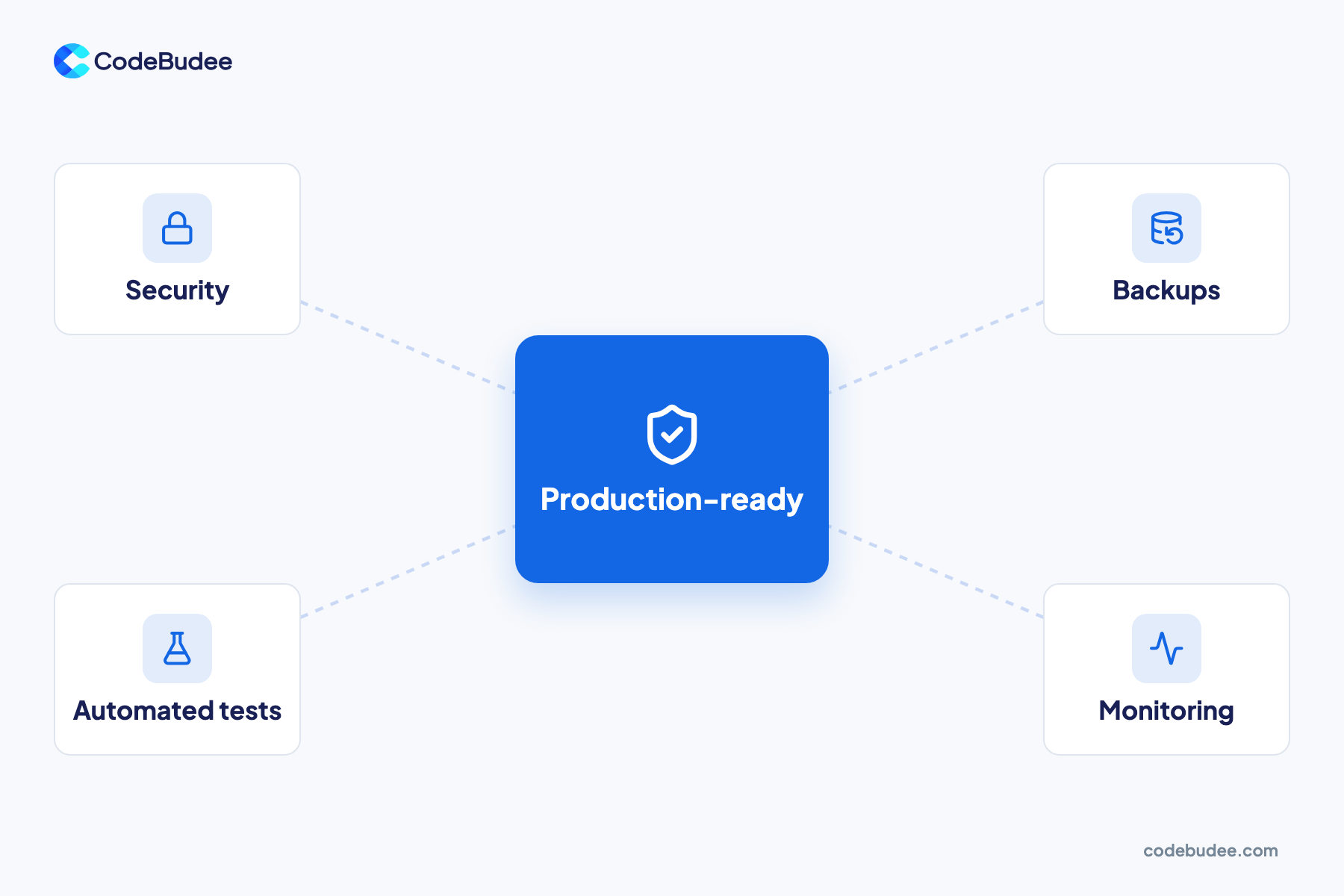
To make an MVP production-ready, add four basics before you scale: security, tested backups, automated tests and monitoring. Security keeps data safe. Backups let you recover after a failure. Tests catch mistakes before customers do. Monitoring tells you when something breaks. Together, they turn a working demo into a system you can depend on.
- Security: check who can log in and what each person can see. Move passwords and keys out of the code. Keep the software and its add-ons up to date.
- Backups: back up your data on a schedule, keep a copy in a separate place and test a restore.
- Automated tests: these are small programs that check the main features still work after each change. Start with the features that bring in money, such as sign-up, checkout or booking.
- Monitoring: tools watch the live system and alert your team when errors rise or pages slow down.
Weak security is expensive when it fails. IBM's Cost of a Data Breach Report 2026 puts the global average breach cost at US$4.99 million. That is a 12% rise on the year before, and a record high.
Plan for growth too. Find the slowest pages and the busiest features, and fix those first.
Is an AI-built prototype ready for production?
An AI-built prototype is not ready for production as it stands. AI tools can produce a working demo fast, which is great for testing an idea. But the code may hide security gaps and shortcuts. Treat it like any MVP. Review it, test it and fix it before real customers and data depend on it.
Developers use these tools widely, but few fully trust what they produce. In the 2025 Stack Overflow Developer Survey, 84% of respondents said they use or plan to use AI tools. Yet only 3.1% said they highly trust the accuracy of the output.
Asked about frustrations, 66% picked AI answers that are "almost right, but not quite". Also, 45.2% said debugging AI-generated code takes more time.
Security is the bigger worry. Veracode's 2025 GenAI Code Security Report tested code from over 100 large language models. AI-generated code brought in risky security flaws in 45% of tests.
So use AI to test an idea quickly. Then have experienced developers review the code before customers depend on it.
Should you rebuild your MVP or harden it?

Harden your MVP when its core design is sound and the problems sit in a few places. Rebuild when every change fights the original design, or when its tools can no longer grow with you. A full rebuild is the bigger, riskier choice.
Harden it when:
- The way the data is organised fits how your business works.
- Problems sit in a few known places, such as one slow report.
- Tests can be added around the current code.
Rebuild when:
- Each new feature takes longer than the last, because of the original design.
- It runs on a tool that cannot do what you now need, such as a maxed-out no-code platform.
- Nobody can explain how key parts work, and the code has no tests.
Bottom line: get a review of the code, data and set-up before you decide. It shows which parts can stay.
Whichever way you go, replace parts one at a time while the old system keeps running. That keeps customers served during the change. To see how a build moves from plan to launch, read how the custom software development process works.
How CodeBudee approaches this
We build custom systems around how your business works, not around a template. Every quote is itemised, with no hidden costs. You talk directly to the person leading the build. When the work is done, you own 100% of the source code.
We also stay on as a long-term partner after launch, so the system keeps up as you grow. If your MVP is ready for its next stage, see our custom web app development service.
Frequently asked questions
How long does it take to make an MVP production-ready?
It depends on the state of the code and how much must change. A review comes first, because it shows what can stay. Hardening a sound MVP is often a smaller job than a rebuild, which is closer to a new project. Ask for a plan in phases, so urgent risks such as security and backups are fixed first.
Should we hire in-house developers or work with a partner?
It depends on how much change you expect. An in-house team makes sense when software is your main product and changes every week. A partner suits businesses that need a system built and supported, without hiring and keeping a full team. Whichever you choose, make sure your company owns the code and its documentation.
Can we keep using our MVP while it is being fixed?
Yes, in most cases. The safest way is to fix or replace one part at a time while the current version keeps running. Customers keep using it, and each change is tested before it goes live. A full switch-over on one day carries more risk. Keep it for when a step-by-step move is not possible.
What does it cost to take an MVP to production?
The cost depends on how much must change and how complex the system is. Adding backups and monitoring is often a smaller job than rebuilding core features. Ask for an itemised quote, so you can see the cost of each part. Our guide to what sets the price of custom software explains the main cost drivers.
Your next step
A working MVP proves people want your product. Production is about whether they can depend on it. Check your system against the warning signs above. If two or more apply, add security, tested backups, automated tests and monitoring before you scale. Then use a code review to decide whether to harden it or rebuild.
Book a free consultation to talk through your MVP and what it needs before real users arrive.
